Thursday, 4 October 2012

Taking Meeting Notes in OneNote 2013


One of the most common places we take notes is at work during meetings. We do this to remind ourselves about how was there, what was said, and also who had been tasked with an action.

This has been made really easy with One Note 2013. Have a look at this blog to get the low down..


http://blogs.msdn.com/b/descapa/archive/2012/08/28/taking-meeting-notes-in-onenote-2013.aspx

Script Resources

Was looking for some PowerShell scripts and found this website which I found useful..

http://gallery.technet.microsoft.com/scriptcenter/site/search?f[0].Type=RootCategory&f[0].Value=messaging&f[0].Text=Messaging%20%26%20Communication

Lync 2013 training slides and labs for developers


You can download slide decks and lab materials which are designed to train developers on using the development models and APIs associated with Lync 2013, UCMA 4.0, UC Web API, Persistent Chat, and Outlook apps.

http://www.microsoft.com/en-us/download/details.aspx?id=30465

Tuesday, 18 September 2012

Microsoft Windows 8 Enterprise Activation

I decided to install Windows 8 Enterprise soon after it was released. The install was painless, but activating turned out to be a bit of a pain to say the least.

To activate you have 2 options. You can use either use the command line or the gui.

To use the command line, open a command line and type in the following:

slmgr -ipk xxxxx-xxxxx-xxxxx-xxxxx-xxxxx

to get to the run command use the windows key combination : Windows key + R

Using the gui:

use the key combination described above and type in :

slui.exe 3

and you get the following dialogue box which makes it easy to activate your copy of Windows 8

image

Hope that helps!

Thursday, 16 August 2012

Microsoft Private Cloud Guided Labs

A very useful place to go to learn about Private clouds…

http://technet.microsoft.com/en-gb/evalcenter/hh913622.aspx?ocid=&wt.mc_id=TEC_113_1_24

Microsoft Lync Server 2013 Preview Evaluation Resources

As the title says……..

http://technet.microsoft.com/en-gb/evalcenter/hh973394

Microsoft Lync 2013 Preview in a Virtual Desktop Infrastructure

One of the cool new features of Lync 2013 is the ability to use VDI. As ever there is an article on Dr Rez. What this allows you to do is to is have enterprise grade, real-time audio and video communication in a virtual desktop infrastructure (VDI) environment, either from your thin clients, or from your thick clients

Read about it here:

http://blogs.technet.com/b/nexthop/archive/2012/07/31/microsoft-lync-2013-preview-in-a-virtual-desktop-infrastructure.aspx

Managing Mac’s in a corporate environment

I was asked by a delegate this week on how to manage Apple Mac’s and iPads in a corporate environment.

Here is a product that will do that for you:

Its called The Casper Suite and is by Jamf and you can see it here:

http://www.jamfsoftware.com/products/casper-suite

Wednesday, 15 August 2012

SCCM 2012 Reporting fix for Editing a report

SCCM 2012 uses SQL 2008 R2 for storing its config and data. SCCM 2012 also use SQL Reporting Services 2008 R2 and there is a bug when you try edit a report.

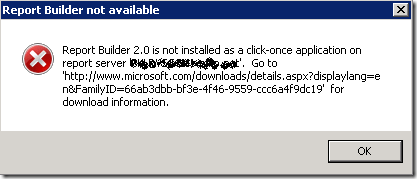
If you try edit a report you get the following:

this is taken from

Ben's System Center Experience

so to save myself some typing here is his blog post:

For System Center Configuration Manager 2012 with SQL Server 2008 R2, you will receive this error while create/edit report from Console.

Error: Report Builder not available
Report Builder 2.0 is not installed as a click-once application on report server
image

To fix this, please change registry value to :

[HKLM\SOFTWARE\Wow6432Node\Microsoft\ConfigMgr10\AdminUI\Reporting]
"ReportBuilderApplicationManifestName"="ReportBuilder_3_0_0_0.application"

Download : ReportBuilder3.reg

P/S: after fix the registry still not work, please run Console as Administrator

If you need standalone Report Builder 3.0, download here.

More details from Microsoft

Friday, 10 August 2012

What’s NEW in Lync 2013

Lync 2013 preview is available for download and I have been testing it out and so far really like it! If you want to download and test then do an internet search and download as part of the Office 2013 suite.

To see the new features have a look at the Lync Team Blog which is:

http://blogs.technet.com/b/lync/archive/2012/08/03/what-s-new-in-lync-2013.aspx

My Blog List